Manage payments
Understand card payments, e-transfer tracking, refunds, deposits, and balances in GoalieBook.
GoalieBook supports card payments through Stripe and manual payment tracking for methods such as e-transfer or cash. Payment status helps you know which registrations are fully paid, partially paid, refunded, or still pending.
Card payments
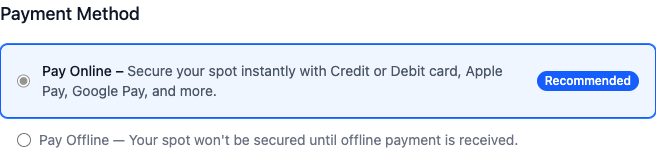
When card payments are enabled, families pay through Stripe Checkout. Stripe processes the payment and GoalieBook updates the registration automatically. This usually happens quickly, but there can be a short delay.
A card registration doesn't hold a spot until it's paid. If a family leaves checkout before paying, they can finish from their GoalieBook account page with Complete card payment, or Pay balance by card for a balance. GoalieBook checks that the program still has room and registration is still open, then reopens their checkout or starts a new one. A checkout page expires after an hour, so families should always start from their account page rather than an old checkout link. If a family somehow pays twice for the same payment, GoalieBook records the second payment without applying it, marks it in the registration details, and GoalieBook support follows up to refund it.
Some families may pay with a bank payment, such as a pre-authorized debit, if it's enabled for your Stripe account. Bank payments take a few business days to clear. While one clears, the registration shows Bank payment processing and the family's spot is held. GoalieBook confirms the registration and sends the confirmation email once Stripe reports the payment succeeded. If the bank payment fails, the spot is released and the family sees Try payment again on their GoalieBook account page, unless the program has since filled, the age group is full, or registration has closed. The failed attempt stays in the payment history. While a balance payment is processing, GoalieBook doesn't send balance reminders and the registration can't become overdue or have its spot released; you can still cancel it deliberately. You can't mark a registration manually paid while a bank payment is still processing, because it may still clear.
If a family says they paid but the registration still looks unpaid, look the payment up in Payouts & payments on your organization page. If it shows as successful and GoalieBook has not updated after a few minutes, contact support.
E-transfer and manual payments

Manual payment methods let families register while paying outside Stripe. These registrations need coach review because GoalieBook cannot confirm the bank transfer automatically.
After you receive the e-transfer or cash payment, check that the amount matches the invoice, then mark the matching registration paid in the admin area. Keep the admin status aligned with the money received so rosters and reports are reliable.
If an e-transfer registration is still unpaid after 5 days, GoalieBook emails the family a payment reminder. Unpaid e-transfer registrations are cancelled after 7 days. The registration details show when the reminder went out and the payment deadline.
Deposits and balances
Some programs collect a deposit first and a balance later. Review both the deposit and balance status before the clinic starts.
GoalieBook emails families who still owe a balance 1 week before, 3 days before, and on the balance due date. The registration details show when the last reminder went out. Families who register close to the due date only get the reminders still ahead of them.
Families can pay the balance by card from their GoalieBook account when card payments are enabled. When e-transfer is set up, the reminders and account page also include e-transfer instructions for the balance. Mark the balance paid in the admin area once the e-transfer arrives.
Once the balance is paid, the family gets a Balance Paid email whose payment summary lists the registration total, the deposit and balance payments, and a balance remaining of $0.00. Their account dashboard shows the deposit and balance as paid.
Deposits are only offered before the balance due date. From that date on, new registrations pay the full amount. If a family submits a deposit from a page they opened earlier, GoalieBook asks them to review the full amount before they continue.
Refunds
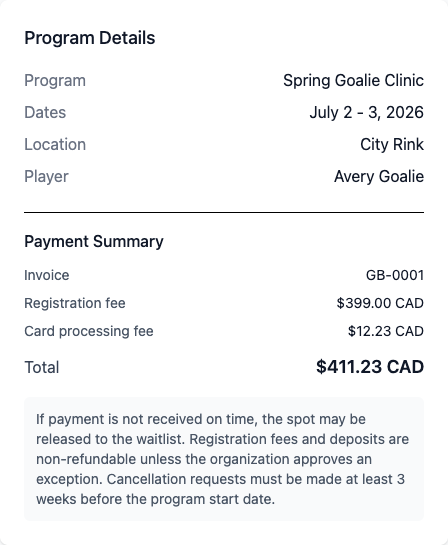
Refund tracking should match the real payment method:
- For card payments, refunding a registration in GoalieBook sends the refund through Stripe for each paid card payment. Unpaid or abandoned checkout attempts are not refunded. Stripe returns the money to the family's card, and banks usually take 5–10 business days to show it.
- GoalieBook emails the family once each refund is complete. If Stripe reports a refund as pending, the registration shows Refund pending and the email goes out when it finishes. If a refund fails, the registration says so and you can use Mark Refunded again to retry; nothing is refunded twice.
- Stripe keeps its processing fee when a card payment is refunded, so a full refund leaves your balance short by that fee. Stripe recovers it from your next payouts, or you can add funds from Payouts & payments.
- For manual payments, return the money yourself, then use Mark Refunded. GoalieBook records the refund and emails the family that it's been recorded.
- Refunding a deposit ends the registration's balance: the family gets no more balance reminders and can no longer pay it. The registration stays on your roster until you cancel it.