How to Display Your Pricing During Goalie Clinic Registration
A plain-language guide to GoalieBook's Registration Settings: tax rates, tax-inclusive pricing, and the registration waiver, how each one appears to goalies at checkout, and how to cover card processing fees in your price.
When a goalie signs up for one of your clinics, the price they see should be clear, honest, and exactly what you intend to collect.
GoalieBook gives you a few simple controls for this in your Registration Settings. Each one changes how your price is presented to goalies during registration, without changing the work of running your clinic.
This guide walks through each setting in plain language:
- Tax rates
- Tax included in the registration fee
- The registration waiver
It also explains how card processing fees work. They aren't a setting: GoalieBook never adds them to checkout as a separate line, so covering them is part of how you set your price.
Let's go through them one at a time.
Where to Find These Settings
Everything below lives in one place.
From your organization page, open Edit Registration Settings.
These settings act as the defaults for new programs and control the waiver shown during registration. As you change them, a live preview on the right shows both Goalie Pricing (what the goalie sees) and Coach Pricing (what you take home after fees and tax).
One important note: once registrations exist for a program, its tax settings are locked. This keeps the price every goalie agreed to consistent. So it's worth getting these right before you open registration.
Tax Rates
A tax rate in GoalieBook is just a label and a percentage, for example "HST 15%."
You can save as many rates as you need, and mark one as the default that new programs start with. New programs can also choose No tax.
Whether you should be charging tax at all depends on where you coach and how much you earn. We cover that in detail in a separate article:
Should Goalie Coaches Charge Tax? (Canada & US Explained Simply)
GoalieBook does not decide your tax obligations for you. It simply applies the rate you choose to the registration fee. How that tax then appears to the goalie is controlled by the next setting.
Tax Included in the Registration Fee
This is the choice between tax-inclusive and tax-on-top pricing.
When the box is checked (tax included):
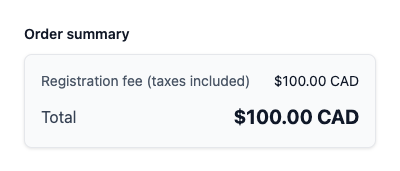
The price you set already contains the tax. A goalie registering for a $100 clinic pays $100, and a small "taxes included" note appears. The tax is calculated out of that $100 behind the scenes for your records.
When the box is unchecked (tax shown separately):
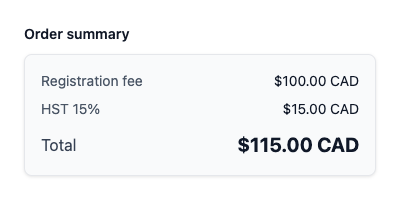
Tax is added as its own line on top of the price. A $100 clinic with 15% HST shows a $100.00 registration fee, $15.00 in HST, and a total of $115.00 that the goalie pays.
Both approaches are legitimate. The difference is purely about presentation:
- Tax included gives a clean, round number. Parents see exactly one figure.
- Tax separate makes it obvious that part of the payment is tax going to the government, not to you.
The one mistake to avoid is the accidental third option: setting a round price, thinking tax is on top, and then quietly absorbing it out of your own pocket. Choosing deliberately here prevents that.
Card Processing Fees
When a goalie pays by card, the payment processor (Stripe) charges a fee on the transaction: roughly 2.9% + $0.30 for domestic cards. That fee comes out of what you receive.
If you want to cover card costs, build them into your price. On a $100 clinic, a price of about $103.30 leaves you roughly $100 after Stripe's fee. The Coach Pricing preview shows what you receive after Stripe, so you can pick a price with the real numbers in front of you.
A few things worth knowing:
- GoalieBook doesn't add a card processing fee as a separate checkout line. A fee added at checkout counts as a card surcharge, and surcharges in Canada are restricted: Quebec prohibits them on credit cards, card networks cap them, and some cards can't be surcharged at all.
- Building the cost into your price is different from a surcharge: everyone sees one price up front.
- E-transfer / EFT payments carry no processing fee and pay the same registration fee.
The Registration Waiver
Every registration includes a waiver the goalie (or their parent) must agree to before they can complete signup.
You have two choices:
- Leave it blank to use GoalieBook's default waiver, which covers the common basics: assumption of risk, release of liability, confirmation of fitness to participate, and permission to use photos and video.
- Write your own to match your specific program, insurance requirements, or organization's language.
Whatever waiver is in effect at the time of registration is saved with that registration. So if you update your waiver later, each goalie's record still reflects the exact text they originally agreed to.
Putting It Together
Here's how these combine into what a goalie actually sees:
- You set a price for the program, including any card processing cost you want to cover.
- Your chosen tax rate determines whether tax applies and at what percentage.
- Tax included decides whether that tax is folded into the price or shown as its own line.
- The waiver is presented for agreement before checkout completes.
The live preview ties it all together, so you never have to guess what the final screen will look like.
The Bottom Line
These settings don't change what you charge. They change how clearly it's presented.
Clean, deliberate pricing does two things at once:
- It builds trust with the parents signing their goalie up.
- It protects your own revenue from accidental shortfalls.
Set them once, check the preview, and every registration that follows will be consistent and easy to understand.
Because when your pricing is clear and predictable, running a goalie clinic gets a whole lot simpler.
Disclaimer
This article is for general informational purposes only and does not constitute tax, legal, or financial advice. Tax rules and processing fees can vary by jurisdiction and circumstance. If you are unsure about your obligations, consult a qualified professional.